Choosing your tools
FIELD NOTES / 01Best Free Online CAD Software in 2026: 4 Browser Tools and FreeCAD Compared
Compare SolidCraft, Onshape, Tinkercad, SketchUp Free and desktop FreeCAD by free-plan limits, privacy, modeling tools and export options.
The short answer
The best free CAD tool depends on the job. Try SolidCraft Online for a dimensioned browser part without signup, Onshape Free for public non-commercial parametric projects, Tinkercad for combining simple shapes, or SketchUp Free for spatial concepts. Choose desktop FreeCAD when local, offline parametric work matters more than avoiding installation. Four of these tools run in a browser; FreeCAD is a desktop alternative. Before choosing, check whether your project may be public, whether commercial use is allowed, how you will keep an editable original, and whether the free plan exports the format your next tool needs.
01Choose by task and free-plan conditions, rather than a universal score.
02Check design visibility before putting a real project in a cloud account.
03Save an editable original alongside any STL or STEP exchange copy.
Written by the maintainers of solidcraft.online, which operates the community editor and optional cloud services. Independent of the upstream SolidCraft maintainers. About this guide and its scope.
What this comparison actually checks
A useful free CAD comparison starts with the work you need to finish. A classroom shape, a mounting plate with exact hole spacing and a room layout ask different things of a modeler. Our recommendations below are editorial judgments about those tasks. They are not numerical rankings of speed, geometric robustness or professional suitability.
We checked the providers’ public descriptions of runtime, accounts, free access, sharing and file exchange on 26 October 2026. We also built, edited, downloaded and reopened example geometry in this site’s SolidCraft v0.23.0 editor. We did not run equivalent modeling exercises in all five products. The two tutorials linked below explain the SolidCraft checks and provide the actual files.
The word “free” describes access conditions, not identical rights. A free cloud tier may restrict commercial work or make documents public. Open-source licensing concerns the software itself; storage, hosted features and account terms still need their own check.
Four browser tools and one desktop alternative
| Tool / runtime | Account and saving | Modeling approach | Free-plan boundary |
|---|---|---|---|
| SolidCraft Online · browser | No account for local modeling; download native backups. Login for optional private cloud projects. | Constraint sketches and editable solid features. | Core editor free; cloud and Batch have separate quotas. This site operates the hosting. |
| Onshape Free · browser | Account and cloud documents; Free documents are public. | Parametric parts and assemblies with collaborative cloud workflows. | Free is for non-commercial use. Public storage is a decisive privacy condition. |
| Tinkercad · browser | Account or classroom access; check the active design’s sharing settings. | Shape-based 3D design; Codeblocks adds a computational workspace. | Free web application. Confirm the workflow and account conditions for your use. |
| SketchUp Free · browser | Trimble account; Trimble Connect cloud storage. | Direct spatial and surface modeling. | Non-commercial use; supported formats differ from paid subscriptions. |
| FreeCAD · desktop | Install locally; no cloud account needed for local files. | Parametric sketches and feature-based modeling. | Open-source desktop software; browser access is not its standard official delivery. |
For exchange, SolidCraft’s editor supports native designs and STL/STEP workflows; Onshape documents STL and STEP export. These format descriptions come from documentation; our downloadable test files verify SolidCraft native designs and STL, without testing a STEP round trip. SketchUp’s current Web file table lists STL and PDF export for Free, and downloading the native SketchUp model is a separate action. FreeCAD lists STEP and STL among its supported formats. Check the exact target format before building a project around it: a mesh export and an editable native design solve different problems.[files][onshapeExport][sketchupFiles][freecad]
The table deliberately avoids “unlimited private free CAD” as a blanket label. Cloud privacy, downloadability and local ownership are separate questions. Open a small test, save it, and reopen the saved result before committing a substantial design.
SolidCraft Online: a small, editable mechanical part
Start here when your immediate goal is to understand a constrained sketch, extrude it and change a dimension. SolidCraft Online runs the editor on your device without requiring signup for local modeling. Our test block changed from 40 × 30 × 10 mm to 50 × 30 × 10 mm and remained editable after native download and reopen.
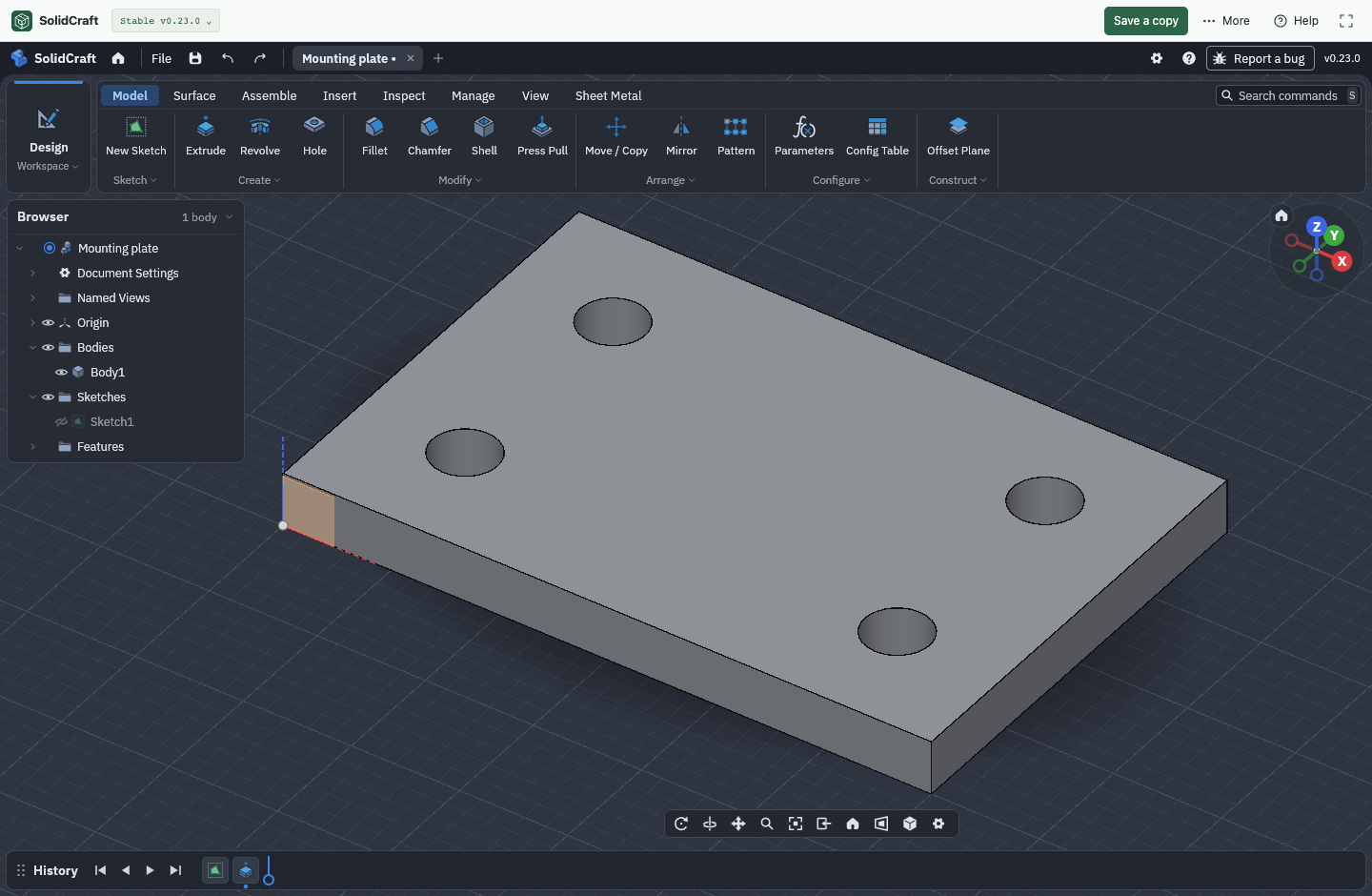
Keep a .solidcraft backup outside browser storage. Optional signed-in cloud saving is a separate, manual workflow. The current Free offer lists 3 private projects and 128 MiB; use the current plan page for the operative limits. A browser copy, a downloaded file and a cloud snapshot should not be described as interchangeable forms of automatic sync.[online][pricing][files]
A good first test is deliberately narrow: modify a block, download it, then reopen that exact file. Our parametric modeling walkthrough takes that test from an empty sketch to a saved revision. It is a more useful starting point than assuming that success with a simple part establishes every assembly, drawing or manufacturing workflow.
Onshape Free: public non-commercial projects
Onshape Free is worth considering when cloud collaboration is central to your project and you can accept its access conditions. The official Free plan includes CAD tools, real-time collaboration and version control, with public documents and non-commercial use. Do not treat a public Free document as a private workspace for confidential design work.[onshape]
For a public learning project, keeping the work accessible to a group may be useful. For an unreleased product or private client part, document visibility becomes an early selection criterion. Write that requirement down before comparing modeling features. The free general plan and education or other eligibility-based programs are different offers.
Check the receiving tool as well. Onshape’s export documentation includes STEP for solid exchange and STL for mesh workflows. An exchange file is not a promise that another CAD application will recover the original feature history.[onshapeExport]
Tinkercad: start with shapes and composition
Tinkercad describes itself as a free web application for 3D design, electronics and coding. Its familiar shape-combination approach is a sensible starting point for a beginner thinking in boxes, cylinders and cutouts. Its separate Codeblocks workspace supports computational design, so describing Tinkercad as having no parametric capability would be misleading.[tinkercad][codeblocks]
Choose the learning task first. A name tag assembled from simple shapes teaches composition. A plate whose hole centers must remain a fixed distance from its edges teaches a different kind of design intent. For the latter, explicitly compare how each tool represents dimensions and relationships, rather than judging from a similar-looking finished object.
Account, classroom and sharing workflows need checking in the context you actually use. We have not tested a Tinkercad account or its current export dialog in this review, so we do not assert a default privacy setting or a verified export-format matrix. Before choosing it for a deliverable, create a small test and confirm that its current Export options match your receiving software.
SketchUp Free: explore space and form
SketchUp Free offers a browser modeler and 10 GB of Trimble Connect storage. Its official guidance limits Free to non-commercial use. It is a candidate for exploring spatial ideas when a direct modeling workflow fits how you think.[sketchup]
A room concept and a dimension-driven mechanical part can both be three-dimensional, yet need different editing behavior. Test the revision you expect to make later: changing a room’s proportions, moving a surface, or changing one constrained dimension while keeping other relationships intact. The way the model responds matters more than the first screenshot.
Use the Free column of SketchUp’s current supported-file table. It lists STL/PDF export, while native model downloading is documented separately. Do not copy a desktop or paid-plan format list into a Free recommendation. If your next step requires a particular solid exchange format, establish that compatibility before investing in the model.[sketchupFiles]
FreeCAD: choose local desktop work deliberately
FreeCAD is an open-source parametric modeler for Windows, macOS and Linux. Its official site describes constrained sketches, editable model history and formats including STEP and STL. It belongs in this shortlist as a desktop alternative, rather than a fifth browser tool.[freecad]
Consider it when installing an application is acceptable and you want a local-file workflow. Consider a browser option when avoiding installation is an actual requirement, such as a quick trial on a shared computer. Those are different constraints; neither alone determines modeling quality.
For a deeper look at the tradeoffs and geometry exchange, read our SolidCraft versus FreeCAD comparison. That page handles the detailed one-to-one comparison; this guide helps you decide which candidate deserves your first practical test.
Make the choice with a ten-minute file test
- Define the deliverable. Write down the part, a revision you expect to make, and the receiving application. “A plate I can resize and send to a slicer” is a useful requirement.
- Apply the access filters. Decide whether you need commercial use, private storage, account-free access or local files. Remove candidates that do not meet the relevant conditions.
- Build one small representative feature. Use a dimensioned rectangle, a hole or a simple shape combination. Change it once and observe what stays related.
- Save both kinds of output. Keep the editable original, then export the exchange file you need. Reopen each in the appropriate application.
- Check recovery. Know where the original lives and how you will recover it if the browser, account or device changes.
To try that path here, open an editable practice, follow the dimension-change tutorial, then use the mounting-plate and STL walkthrough. These exercises provide observable results, not a promise that one tool fits every project.
Common questions
A few things to know
Is free CAD the same as open-source CAD?
No. A free plan can be offered for proprietary software. Open-source licensing concerns rights to the software’s source. Hosted-service terms, document visibility and storage limits are additional questions; review them separately.
Which free plan in this comparison makes documents public?
Onshape’s general Free plan explicitly states that documents are public and use is non-commercial. Do not generalize that rule to its other programs or to every tool in this guide.[onshape]
Can I use FreeCAD directly in a browser?
The standard official FreeCAD offering is a desktop application for Windows, macOS and Linux. A third-party remote desktop or hosting service is a separate offering with its own conditions.[freecad]
Can a free CAD tool produce a 3D-printing file?
Yes, but confirm the current plan and actual export. Our SolidCraft printing walkthrough supplies a real exported STL and its checks. Exporting a mesh alone does not establish correct scale, fit or a successful physical print.
Traceable claims
Sources & verification
Sources checked October 26, 2026. Official documentation supports the product descriptions; our own tests cover the explicitly described SolidCraft examples. Plan conditions and software behavior can change.
- SolidCraft Online: editor, examples and saving ↗Official source · checked October 26, 2026
- SolidCraft Online plans and cloud limits ↗Official source · checked October 26, 2026
- Onshape plans: Free eligibility and public documents ↗Official source · checked October 26, 2026
- Onshape Help: exporting files ↗Official source · checked October 26, 2026
- Tinkercad: free browser design application ↗Official source · checked October 26, 2026
- Tinkercad Codeblocks: computational design ↗Official source · checked October 26, 2026
- SketchUp Free: use conditions and cloud storage ↗Official source · checked October 26, 2026
- SketchUp for Web: supported file types by plan ↗Official source · checked October 26, 2026
- FreeCAD: platforms, parametric modeling and file formats ↗Official source · checked October 26, 2026
- SolidCraft v0.23.0: native files, browser saving and mesh export ↗Official source · checked October 26, 2026
SolidCraft v0.23.0 / native format 37. Our local editor workflow was tested on 26 October 2026. Competitor coverage is based on linked official documentation, not a hands-on performance benchmark.
Editor measurements, environment and file checksums. Found an issue? Send a correction.